
Spaces:
Runtime error


Runtime error
| <div align="right"> | |
| <!-- Language: --> | |
| <a title="Chinese" href="../README.md">简体中文</a> | English | <a title="Japanese" href="README_ja.md">日本語</a> | <a title="Russian" href="README_ru.md">Russian</a> | |
| </div> | |
| <h1 align="center">川虎 Chat 🐯 Chuanhu Chat</h1> | |
| <div align="center"> | |
| <a href="https://github.com/GaiZhenBiao/ChuanhuChatGPT"> | |
| <img src="https://github.com/GaiZhenbiao/ChuanhuChatGPT/assets/70903329/aca3a7ec-4f1d-4667-890c-a6f47bf08f63" alt="Logo" height="156"> | |
| </a> | |
| <p align="center"> | |
| <h3>Lightweight and User-friendly Web-UI for LLMs including ChatGPT/ChatGLM/LLaMA</h3> | |
| <p align="center"> | |
| <a href="https://github.com/GaiZhenbiao/ChuanhuChatGPT/blob/main/LICENSE"> | |
| <img alt="Tests Passing" src="https://img.shields.io/github/license/GaiZhenbiao/ChuanhuChatGPT" /> | |
| </a> | |
| <a href="https://gradio.app/"> | |
| <img alt="GitHub Contributors" src="https://img.shields.io/badge/Base-Gradio-fb7d1a?style=flat" /> | |
| </a> | |
| <a href="https://t.me/tkdifferent"> | |
| <img alt="GitHub pull requests" src="https://img.shields.io/badge/Telegram-Group-blue.svg?logo=telegram" /> | |
| </a> | |
| <p> | |
| Compatible with GPT-4 · Chat with files · LLMs local deployment · Web search · Chuanhu Agent · Fine-tuning | |
| </p> | |
| <a href="https://www.youtube.com/watch?v=MtxS4XZWbJE"><strong>Video Tutorial</strong></a> | |
| · | |
| <a href="https://www.youtube.com/watch?v=77nw7iimYDE"><strong>2.0 Introduction</strong></a> | |
| · | |
| <a href="https://www.youtube.com/watch?v=x-O1jjBqgu4"><strong>3.0 Introduction & Tutorial</strong></a> | |
| || | |
| <a href="https://huggingface.co/spaces/JohnSmith9982/ChuanhuChatGPT"><strong>Online trial</strong></a> | |
| · | |
| <a href="https://huggingface.co/login?next=%2Fspaces%2FJohnSmith9982%2FChuanhuChatGPT%3Fduplicate%3Dtrue"><strong>One-Click deployment</strong></a> | |
| </p> | |
| </p> | |
| </div> | |
| [](https://github.com/GaiZhenbiao/ChuanhuChatGPT/assets/51039745/0eee1598-c2fd-41c6-bda9-7b059a3ce6e7?autoplay=1) | |
| ## ✨ 5.0 Major Update! | |
|  | |
| <sup>New!</sup> An all-new user interface! So exquisite that it doesn't look like Gradio, it even has a frosted glass effect! | |
| <sup>New!</sup> Adapted for mobile devices (including perforated/bezel-less phones), the hierarchy is clearer. | |
| <sup>New!</sup> The history is moved to the left for easier use. And supports search (with regular expressions), delete, and rename. | |
| <sup>New!</sup> Now you can let the large model automatically name the history (Enabled in the settings or configuration file). | |
| <sup>New!</sup> Chuanhu Chat can now be installed as a PWA application for a more native experience! Supported on Chrome/Edge/Safari etc. | |
| <sup>New!</sup> Icons adapted for all platforms, looking more comfortable. | |
| <sup>New!</sup> Supports Finetune (fine-tuning) GPT 3.5! | |
| ## Supported Models | |
| | API Callable Models | Remarks | Locally Deployed Models | Remarks | | |
| | :---: | --- | :---: | --- | | |
| | [ChatGPT(GPT-4)](https://chat.openai.com) | Support fine-tune gpt-3.5 | [ChatGLM](https://github.com/THUDM/ChatGLM-6B) ([ChatGLM2](https://github.com/THUDM/ChatGLM2-6B)) | | |
| | [Azure OpenAI](https://azure.microsoft.com/en-us/products/ai-services/openai-service) | | [LLaMA](https://github.com/facebookresearch/llama) | Support Lora models | |
| | [Google PaLM](https://developers.generativeai.google/products/palm) | Not support streaming | [StableLM](https://github.com/Stability-AI/StableLM) | |
| | [iFlytek Starfire Cognition Large Model](https://xinghuo.xfyun.cn) | | [MOSS](https://github.com/OpenLMLab/MOSS) | |
| | [Inspur Yuan 1.0](https://air.inspur.com/home) | | [Qwen](https://github.com/QwenLM/Qwen/tree/main) | |
| | [MiniMax](https://api.minimax.chat/) | | |
| | [XMChat](https://github.com/MILVLG/xmchat) | Not support streaming | |
| | [Midjourney](https://www.midjourney.com/) | Not support streaming | |
| | [Claude](https://www.anthropic.com/) | | |
| ## Usage Tips | |
| ### 💪 Powerful Functions | |
| - **Chuanhu Assistant**: Similar to AutoGPT, automatically solves your problems; | |
| - **Online Search**: Is ChatGPT's data too old? Give LLM the wings of the internet; | |
| - **Knowledge Base**: Let ChatGPT help you speed read quantumly! Answer questions based on files. | |
| - **Local LLM Deployment**: One-click deployment, get your own large language model. | |
| ### 🤖 System Prompt | |
| - The system prompt can effectively enable role-playing by setting prerequisite conditions; | |
| - ChuanhuChat presets Prompt templates, click `Load Prompt Template`, choose the Prompt template collection first, then choose the Prompt you want in the list below. | |
| ### 💬 Basic Conversation | |
| - If the answer is not satisfactory, you can try the `Regenerate` button again, or directly `Delete this round of conversation`; | |
| - Input box supports line breaks, press <kbd>Shift</kbd> + <kbd>Enter</kbd> to make one; | |
| - Using the <kbd>↑</kbd> <kbd>↓</kbd> arrow keys in the input box, you can quickly switch between send records; | |
| - Generating a new conversation every time is too cumbersome, try the `single-dialogue` function; | |
| - The small button next to the answer bubble not only allows `one-click copy`, but also lets you `view the original Markdown text`; | |
| - Specify the answer language, so that ChatGPT will always reply in a certain language. | |
| ### 📜 Chat History | |
| - Dialogue history will be automatically saved, you won't have to worry about not being able to find it after asking; | |
| - Multi-user history isolation, only you can see them; | |
| - Rename chat, easy to find in the future; | |
| - <sup>New!</sup> Magically auto-name the chat, let LLM understand the conversation content, and automatically name the chat for you! | |
| - <sup>New!</sup> Search chat, supports regular expressions! | |
| ### 🖼️ Small and Beautiful Experience | |
| - Self-developed Small-and-Beautiful theme, gives you a small and beautiful experience; | |
| - Automatic light and dark color switching, gives you a comfortable experience from morning till night; | |
| - Perfectly rendering LaTeX / tables / code blocks, supports code highlighting; | |
| - <sup>New!</sup> Non-linear animations, frosted glass effect, so exquisite it doesn't look like Gradio! | |
| - <sup>New!</sup> Adapted for Windows / macOS / Linux / iOS / Android, from icon to screen adaptation, gives you the most suitable experience! | |
| - <sup>New!</sup> Supports PWA app installation for an even more native experience! | |
| ### 👨💻 Geek Functions | |
| - <sup>New!</sup> Supports Fine-tuning gpt-3.5! | |
| - Plenty of available LLM parameters to adjust; | |
| - Supports API-host switching; | |
| - Supports custom proxies; | |
| - Supports multiple api-key load balancing. | |
| ### ⚒️ Deployment Related | |
| - Deployment to the server: Set in `config.json` `"server_name": "0.0.0.0", "server_port": <your port number>,`. | |
| - Obtain public link: Set in `config.json` `"share": true,`. Note that the program must be running to access it through public links. | |
| - Use on Hugging Face: It's recommended to **Duplicate the Space** in the top right corner before using, the App response might be faster. | |
| ## Quick Start | |
| Execute the following commands in the terminal: | |
| ```shell | |
| git clone https://github.com/GaiZhenbiao/ChuanhuChatGPT.git | |
| cd ChuanhuChatGPT | |
| pip install -r requirements.txt | |
| ``` | |
| Then make a copy of `config_example.json`, rename it to `config.json`, and then fill in your API-Key and other settings in the file. | |
| ```shell | |
| python ChuanhuChatbot.py | |
| ``` | |
| A browser window will automatically open, at this point you can use **Chuanhu Chat** to chat with ChatGPT or other models. | |
| > **Note** | |
| > | |
| > Please check our [wiki page](https://github.com/GaiZhenbiao/ChuanhuChatGPT/wiki/使用教程) for detailed instructions.). | |
| ## Troubleshooting | |
| When you encounter problems, you should try to **manually pull the latest changes<sup>1</sup>** and **update dependencies<sup>2</sup>** first, then retry. Steps are: | |
| 1. Click on the `Download ZIP` button on the website, download the latest code and unzip to replace, or | |
| ```shell | |
| git pull https://github.com/GaiZhenbiao/ChuanhuChatGPT.git main -f | |
| ``` | |
| 2. Try to install dependencies again (the project might have new dependencies) | |
| ``` | |
| pip install -r requirements.txt | |
| ``` | |
| Generally, you can solve most problems by following these steps. | |
| If the problem still exists, please refer to this page: [Frequently Asked Questions (FAQ)](https://github.com/GaiZhenbiao/ChuanhuChatGPT/wiki/常见问题) | |
| This page lists almost all the possible problems and solutions. Please read it carefully. | |
| ## More Information | |
| More information could be found in our [wiki](https://github.com/GaiZhenbiao/ChuanhuChatGPT/wiki): | |
| - [How to contribute a translation](https://github.com/GaiZhenbiao/ChuanhuChatGPT/wiki/Localization) | |
| - [How to make a contribution](https://github.com/GaiZhenbiao/ChuanhuChatGPT/wiki/贡献指南) | |
| - [How to cite the project](https://github.com/GaiZhenbiao/ChuanhuChatGPT/wiki/使用许可#如何引用该项目) | |
| - [Project changelog](https://github.com/GaiZhenbiao/ChuanhuChatGPT/wiki/更新日志) | |
| - [Project license](https://github.com/GaiZhenbiao/ChuanhuChatGPT/wiki/使用许可) | |
| ## Starchart | |
| [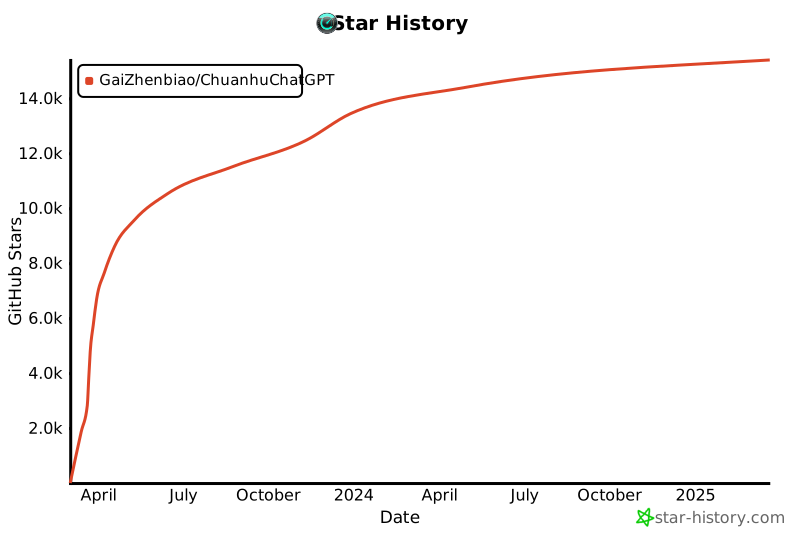](https://star-history.com/#GaiZhenbiao/ChuanhuChatGPT&Date) | |
| ## Contributors | |
| <a href="https://github.com/GaiZhenbiao/ChuanhuChatGPT/graphs/contributors"> | |
| <img src="https://contrib.rocks/image?repo=GaiZhenbiao/ChuanhuChatGPT" /> | |
| </a> | |
| ## Sponsor | |
| 🐯 If you find this project helpful, feel free to buy me a coke or a cup of coffee~ | |
| <a href="https://www.buymeacoffee.com/ChuanhuChat" ><img src="https://img.buymeacoffee.com/button-api/?text=Buy me a coffee&emoji=&slug=ChuanhuChat&button_colour=219d53&font_colour=ffffff&font_family=Poppins&outline_colour=ffffff&coffee_colour=FFDD00" alt="Buy Me A Coffee" width="250"></a> | |
| <img width="250" alt="image" src="https://user-images.githubusercontent.com/51039745/226920291-e8ec0b0a-400f-4c20-ac13-dafac0c3aeeb.JPG"> | |